Migrasi & Upgrade ArcGIS Enterprise 10.8.1 to 11.4 or lates #225

Open
opened 9 months ago by rbsetiawan · 4 comments
Owner

Material

Data

  • ArcGIS Server :
  • Portal for ArcGIS :
    • WebMap
    • WebApp
    • Dashboard
    • Map Series / Storie Map
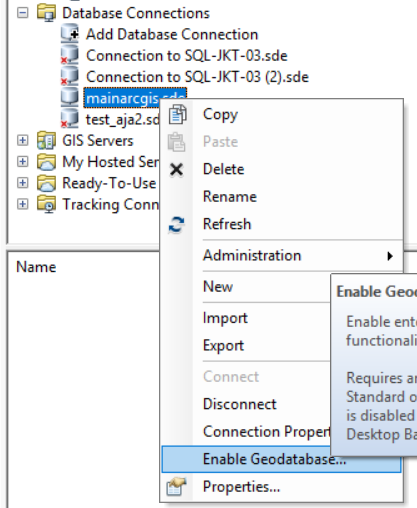
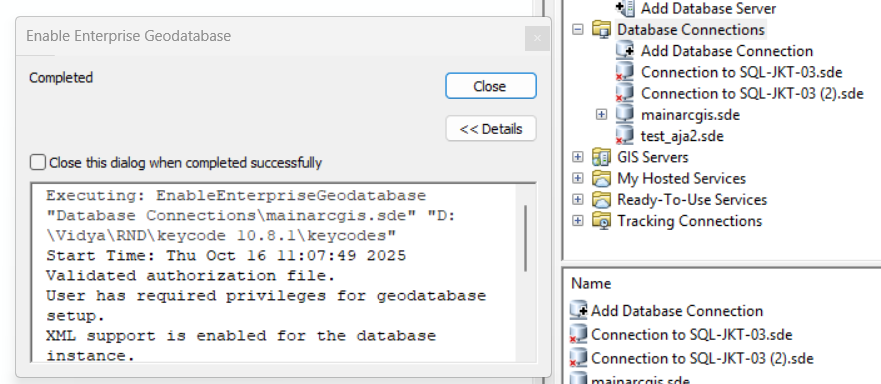
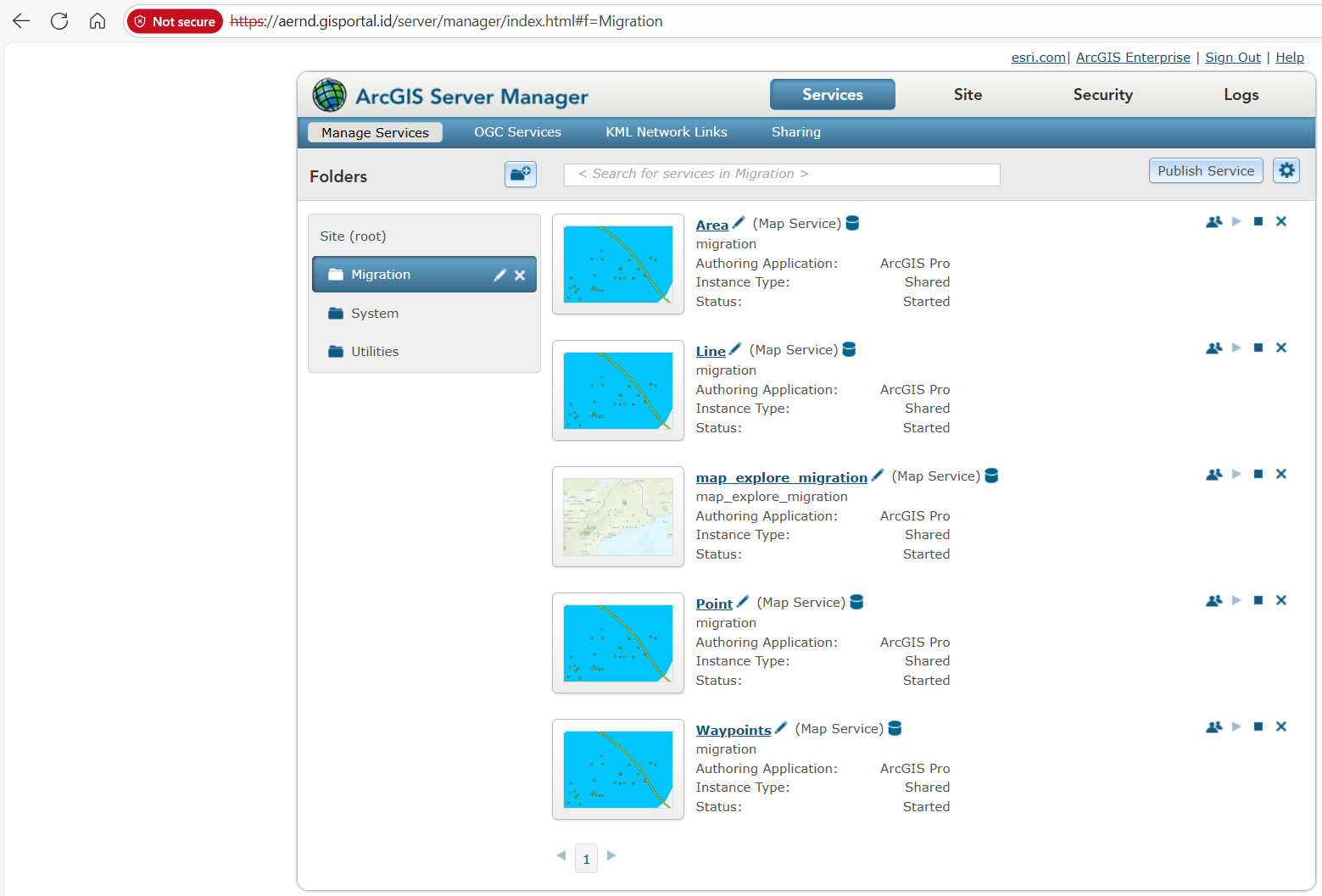
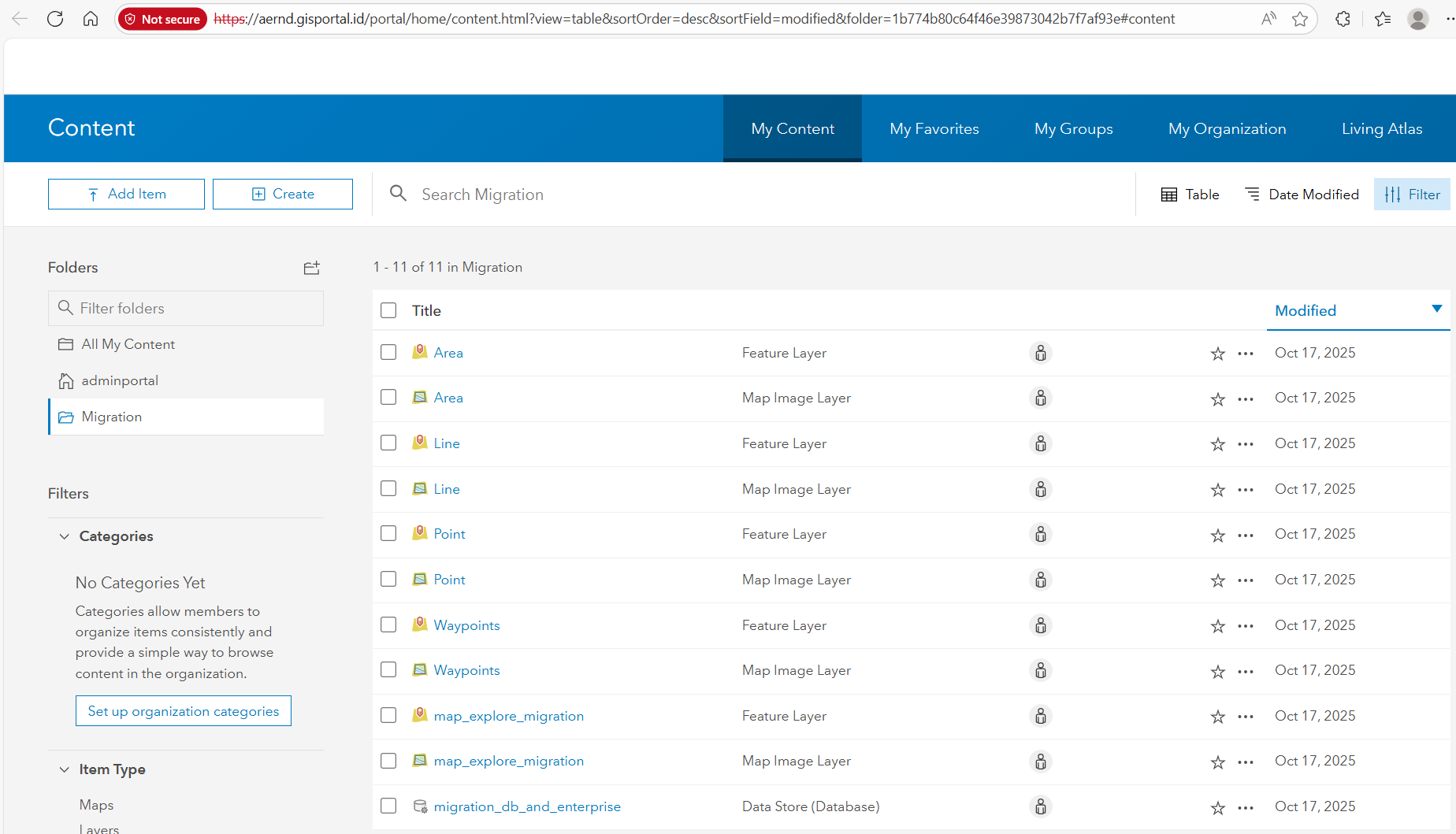
# Material - ArcGIS Enterprise 10.8.1 - spesification - Windows Server 2016 - RAm 16 GB - CPU 8 Core - Sotrage 100 GB - Hostname (FQDN) : RND00.Sec.id - Join AD : Sec.id - ip 10.100.1.72 - Portal for ArcGIS : https://aernd.gisportal.id/portal - username : `adminportal` - password : `geonet.123` - url portal : ![image](/attachments/c791aff1-76e0-4e9c-8238-175e0623487c) - Home : https://aernd.gisportal.id/portal/home - Gallery : https://aernd.gisportal.id/portal/home/gallery.html - Maps : https://aernd.gisportal.id/portal/home/webmap/viewer.html - Scene : https://aernd.gisportal.id/portal/home/webscene/viewer.html - Groups : https://aernd.gisportal.id/portal/home/groups.html - Content : https://aernd.gisportal.id/portal/home/content.html - Organization : https://aernd.gisportal.id/portal/home/organization.html - ArcGIS Server : https://aernd.gisportal.id/server ![image](/attachments/1f2a42f6-4ff1-4bd8-aa8a-b111a142d1de) - Sql Server 2016 : database.gisportal.id:1434 - ip 10.100.1.75 - database : mainarcgis - username : rndarcgis - password : geonet$1234 - database option |before|after| |---|---| |![image](/attachments/0e354de5-8cfb-449a-9424-16e74755c082) |![image](/attachments/cc17d7fe-cb56-4936-b371-51c65928d877) | - Sharing Folder |In Server|Share On User| |---|---| |![image](/attachments/e3d92b83-02b0-479a-a597-4991c6be3e55) |![image](/attachments/5ae3a528-4432-4863-a614-b68bb25c48d9) | - Windwos + R - \\10.100.1.72 - username : arcgis - password : geonet$123 # Data - ArcGIS Server : - Keycodes : `ada di sharing folder \\10.100.1.72\img` ![image](/attachments/0795487e-51d5-41be-a5de-d3b09b1459fc) - Enable Geodatabase : https://git.gisportal.id/rbsetiawan/ArcGIS/issues/82 - Feature Service + Map Service - Poin, Line, Polygon, Relational Class (table) - Image Layer - Elevation Layer - Portal for ArcGIS : - WebMap - WebApp - Dashboard - Map Series / Storie Map
Poster
Owner

Connection from SSMS

error

WhatsApp Image 2025-10-16 at 09.49.39_dfedc98f

solution

image

# Connection from SSMS # error ![WhatsApp Image 2025-10-16 at 09.49.39_dfedc98f](/attachments/8b380811-4fff-4cf1-a5a8-ccd9b6c4e54d) # solution ![image](/attachments/beb3793f-6777-42c4-aa74-971fa860505c)

STEP ENABLE GEODATABASE

Issue (anomaly) and Solution

Issue:

  • Enable Enterprise Geodatabase SQL2016 with keycode Enterprise 11.4 Error!
  • ERROR 161019: The database version is not supported.
  • Execute tool: ArcGIS Pro 3.5.3 version
    image

Issue:

  • Enable Enterprise Geodatabase SQL2016 with keycode Enterprise 10.8.1 Error!
  • ERROR 161019: The database version is not supported.
  • Execute tool: ArcGIS Pro 3.5.3 version
    image

Anomaly:

When create database connection in ArcGIS Pro 2.6:

  • New database has been enable enterprise geodatabase
    image

When create database connection in ArcGIS Pro 3.5:

  • New database has not enable enterprise geodatabase yet and cannot create connection again
    image image

Solution:

  • Execution tool using by ArcMap 10.6
    image

  • enable enterprise geodatabase using by keycode 10.8.1
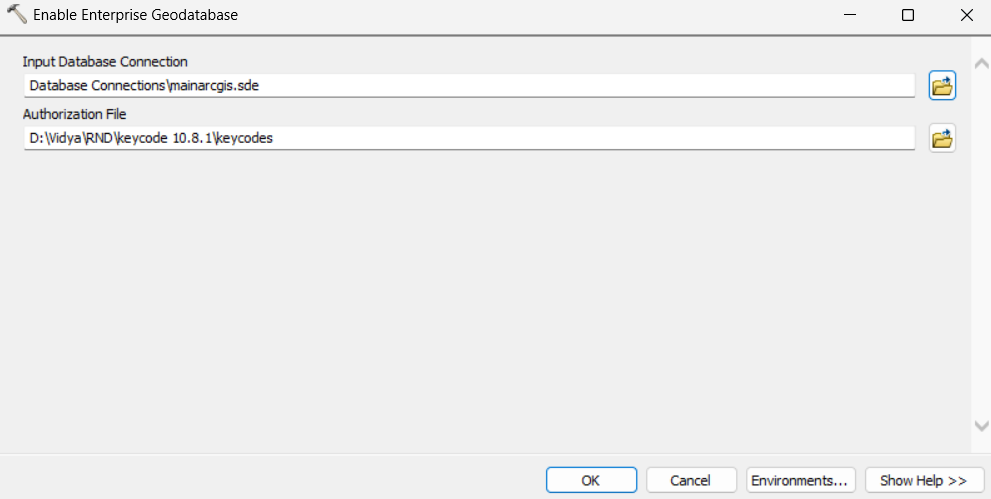
    image

  • execution status: success!
    image


Additional Notes:

Matriks ArcGIS Enterprise - SQLServer Compatibility
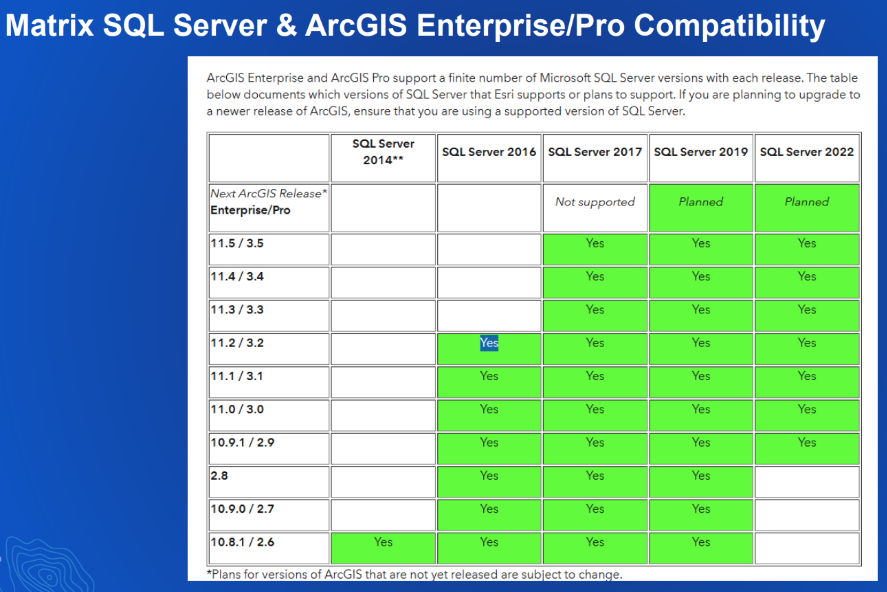
image

# STEP ENABLE GEODATABASE ## Issue (anomaly) and Solution ### Issue: - Enable Enterprise Geodatabase SQL2016 with keycode Enterprise 11.4 Error! - ERROR 161019: The database version is not supported. - Execute tool: ArcGIS Pro 3.5.3 version ![image](/attachments/562b8bd7-e877-4ec5-9a7d-98ad22613c4c) ### Issue: - Enable Enterprise Geodatabase SQL2016 with keycode Enterprise 10.8.1 Error! - ERROR 161019: The database version is not supported. - Execute tool: ArcGIS Pro 3.5.3 version ![image](/attachments/47e9fbb9-89e4-4948-94c7-0348c02d8b08) ----- ## Anomaly: When create database connection in ArcGIS Pro 2.6: - New database has been enable enterprise geodatabase ![image](/attachments/b1c9fcfe-c6ca-47d5-929b-d0708b5edec2) When create database connection in ArcGIS Pro 3.5: - New database has not enable enterprise geodatabase yet and cannot create connection again ![image](/attachments/86c31721-c204-42de-b956-5347a7c91181) ![image](/attachments/f70b16c1-0397-4373-a1c7-847f8feec288) ----- ## Solution: * Execution tool using by ArcMap 10.6 ![image](/attachments/03ffbf3a-0de9-4dfc-b83d-b0e7abaedd40) * enable enterprise geodatabase using by keycode 10.8.1 ![image](/attachments/1125c9a4-4855-4398-88bb-1122384f803c) * execution status: success! ![image](/attachments/b97203be-126c-4222-bb0a-a995d478df40) ----- ## Additional Notes: Matriks ArcGIS Enterprise - SQLServer Compatibility ![image](/attachments/2950bb3f-cd2f-48d5-8a9a-297b672b60ea)

Update Feature Service

  • Data:

    • Poin, Line, Polygon, Tabel Relational Class (table)
      image
  • Execution tools: ArcGIS Pro 3.5.3

  • Publish status: Success
    image
    image

# Update Feature Service * Data: * Poin, Line, Polygon, Tabel Relational Class (table) ![image](/attachments/98fc8c78-70db-4baa-b2fd-ff143d3774f7) * Execution tools: ArcGIS Pro 3.5.3 * Publish status: Success ![image](/attachments/b27588a2-199f-4b28-b728-eb468b4980fd) ![image](/attachments/971f9d06-b0ea-431b-9305-d44432c94e11)
445 KiB
202 KiB
238 KiB

Create Application in ArcGIS Enterprise 10.8.1

Webmap

image

Webapp

image

Dashboard

image

Storymaps

image

Storymap series

image

# Create Application in ArcGIS Enterprise 10.8.1 ## Webmap ![image](/attachments/7a7c7ef9-353a-4c9a-af53-c06df4cc2365) ## Webapp ![image](/attachments/1df011e9-cfcf-4e05-8bbf-3a0ae9ab2d56) ## Dashboard ![image](/attachments/57931953-e702-48e8-9185-833d9bbf235e) ## Storymaps ![image](/attachments/d706ea85-eb51-4a6a-a206-c2f873f1088f) ## Storymap series ![image](/attachments/9a884b03-7d4c-45ca-a3ce-7efd5be25cd3)
1.3 MiB
1.1 MiB
990 KiB
1001 KiB
880 KiB
Sign in to join this conversation.
Loading…
There is no content yet.