
Error ArcGIS Geoevent : An SSL Handshake error has occurred when attempting to communicate with URL #1
Closed
opened 3 years ago by rbsetiawan
·
1 comments
No Milestone
1 Participants

Notifications
Due Date
2023-07-31
Dependencies
This issue currently doesn't have any dependencies.
Loading…
Reference in new issue
There is no content yet.
Delete Branch '%!s(MISSING)'
Deleting a branch is permanent. It CANNOT be undone. Continue?
An SSL Handshake error has occurred when attempting to communicate with URL: "https://rnd.gisportal.id:6443/arcgis/help/en/geoevent". Please make sure you have imported the SSL certificate from "https://rnd.gisportal.id:6443/arcgis/help/en/geoevent" into GeoEvent's site via the ArcGIS Server Admin API. Root Cause: "PKIX path building failed: sun.security.provider.certpath.SunCertPathBuilderException: unable to find valid certification path to requested target".
Arsitektur:
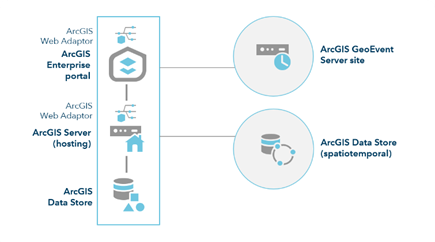
Originally posted by @rbsetiawan in rbsetiawan/GUIDE#2
Error ArcGIS GeoEvent Server startup install and configto Error ArcGIS Geoevent : An SSL Handshake error has occurred when attempting to communicate with URL 3 years agoNote:
Import All default ssl server to other server
Import SSL portal (default) to ArcGIS GeoEvent ServerImport selfsignedcertificate ArcGIS Server (Hosting Server) to ArcGIS GeoEvent ServerImport SSL gisportal.id to ArcGIS GeoEvent ServerImport selfsignedcertificate ArcGIS Server (Hosting Server) to Portal for ArcGISImport selfsignedcertificate ArcGIS GeoEvent Server to Portal for ArcGISImport SSL gisportal.id to Portal for ArcGISImport SSL portal (default) to ArcGIS Server (Hosting)Import selfsignedcertificate ArcGIS GeoEvent Server to ArcGIS Server (Hosting)Import SSL gisportal.id to Portal for ArcGISupdate default ssl to gisportal.id 👍
Kesimpulan ini tidak di sarankan
Error ssl pada log ArcGIS GeoEvent Server karena default SSL ArcGIS di anggap tidak valid dalam konfigurasi federeted, maka dapat menggunakan alternatif Update ssl
namun akan terjadi error pada ArcGIS Server dan Server laainya.
Best Practice
lihat di sini:can't configure imageserver roles from portal/home
kesimpulan 👍 👍 💯