VMware ESXi hypervisor
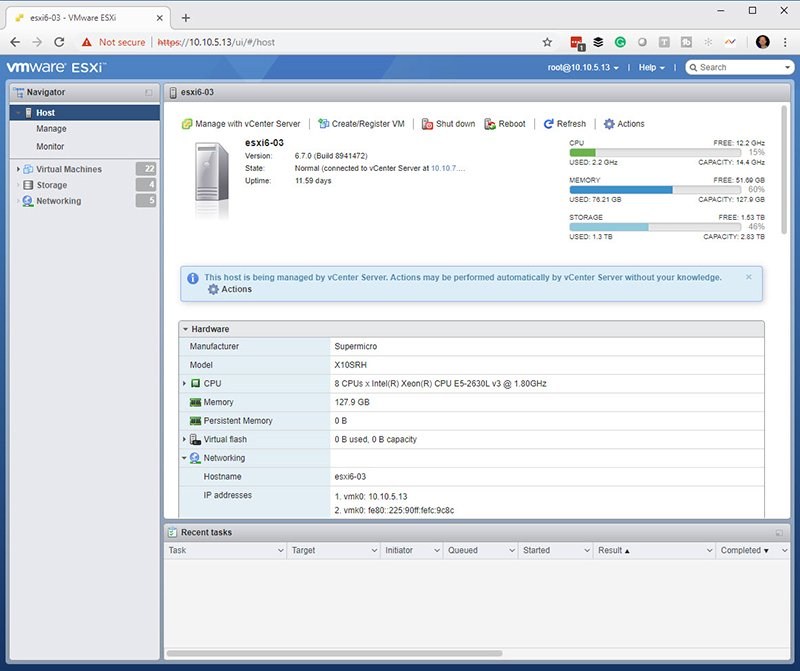
VMware ESXi. Juga dikenal sebagai vSphere Hypervisor, VMware ESXi adalah bare-metal hypervisor yang diinstal langsung di server host. ESXi memberikan akses dan kontrol langsung terhadap sumber daya perangkat keras, memungkinkan administrator untuk mengkonfigurasi, menerapkan, menjalankan, dan memelihara VM serta virtual appliances.
perangkat lunak manajemen vCenter Server
vCenter Server. VMware vCenter Server menyediakan antarmuka terpusat bagi administrator untuk mengelola lingkungan vSphere, termasuk host ESXi dan VM-nya. Dengan vCenter Server, administrator bisa mengoptimalkan operasi dan mengatasi masalah dengan lebih cepat
Komponen VMware vSphere:
Memerlukan infrastruktur fisik untuk meng-host dan mengelola lingkungan virtual. Komponen utama dalam topologi fisiknya meliputi:
Server x86 standar untuk menjalankan VM dan perangkat lunak manajemen.
Infrastruktur penyimpanan, seperti sistem Network-Attached Storage (NAS) atau Jaringan penyimpanan (SAN).
Jaringan IP dan adaptor fisik untuk komunikasi.
Perangkat untuk menjalankan klien manajemen.
Kelebihan dan Kekurangan vShere
Kelebihan
Keunggulan terbesar dari platform ini adalah teknologinya yang telah teruji
vSphere juga stabil dan andal.
mendukung klaster dengan ketersediaan tinggi dan mencakup berbagai fitur untuk menyederhanakan penerapan VM.
Karena VMware banyak digunakan dan memiliki basis pengguna yang besar, administrator dapat dengan mudah menemukan berbagai sumber informasi, termasuk bantuan online, artikel teknis, forum pengguna, video, dan lainnya.
Kelemahan Kompleksitasnya. Selama bertahun-tahun, para administrator mengungkapkan kekhawatiran tentang kegunaan dan tingkat kesulitannya. Selain itu, kompleksitas platform ini dapat membuat pemecahan masalah menjadi lebih sulit. Platform ini juga memiliki reputasi sebagai perangkat lunak yang mahal dengan sistem lisensi yang terlalu rumit, meskipun langkah terbaru ke model langganan yang lebih sederhana mungkin dapat mengurangi beberapa kekhawatiran ini.
CPU berikut didukung dalam rilis vSphere 7.0, tetapi mereka mungkin tidak didukung dalam rilis vSphere di masa mendatang
Intel Family 6, Model = 2A (Sandy Bridge DT/EN, GA 2011)
Intel Family 6, Model = 2D (Sandy Bridge EP, GA 2012)
Intel Family 6, Model = 3A (Ivy Bridge DT/EN, GA 2012)
AMD Family 0x15, Model = 01 (Bulldozer, GA 2012)
## INSTALL and SETUP: https://www.nakivo.com/blog/vmware-vsphere-7-installation-setup/
## VMware vSphere = platform virtualisasi
**Dua produk utamanya adalah**
1. VMware ESXi hypervisor
VMware ESXi. Juga dikenal sebagai vSphere Hypervisor, VMware ESXi adalah bare-metal hypervisor yang diinstal langsung di server host. ESXi memberikan akses dan kontrol langsung terhadap sumber daya perangkat keras, memungkinkan administrator untuk mengkonfigurasi, menerapkan, menjalankan, dan memelihara VM serta virtual appliances.
2. perangkat lunak manajemen vCenter Server
vCenter Server. VMware vCenter Server menyediakan antarmuka terpusat bagi administrator untuk mengelola lingkungan vSphere, termasuk host ESXi dan VM-nya. Dengan vCenter Server, administrator bisa mengoptimalkan operasi dan mengatasi masalah dengan lebih cepat
**Komponen VMware vSphere:**
Memerlukan infrastruktur fisik untuk meng-host dan mengelola lingkungan virtual. Komponen utama dalam topologi fisiknya meliputi:
- **Server x86 standar** untuk menjalankan VM dan perangkat lunak manajemen.
- Infrastruktur penyimpanan, seperti sistem **Network-Attached Storage (NAS)** atau **Jaringan penyimpanan (SAN)**.
- Jaringan IP dan adaptor fisik untuk komunikasi.
- Perangkat untuk menjalankan klien manajemen.
## Kelebihan dan Kekurangan vShere
**Kelebihan**
- Keunggulan terbesar dari platform ini adalah teknologinya yang telah teruji
- vSphere juga stabil dan andal.
- mendukung klaster dengan ketersediaan tinggi dan mencakup berbagai fitur untuk menyederhanakan penerapan VM.
Karena VMware banyak digunakan dan memiliki basis pengguna yang besar, administrator dapat dengan mudah menemukan berbagai sumber informasi, termasuk bantuan online, artikel teknis, forum pengguna, video, dan lainnya.
**Kelemahan**
**Kompleksitasnya**. Selama bertahun-tahun, para administrator mengungkapkan kekhawatiran tentang kegunaan dan tingkat kesulitannya. Selain itu, kompleksitas platform ini dapat membuat pemecahan masalah menjadi lebih sulit. Platform ini juga memiliki reputasi sebagai perangkat lunak yang mahal dengan sistem lisensi yang terlalu rumit, meskipun langkah terbaru ke model langganan yang lebih sederhana mungkin dapat mengurangi beberapa kekhawatiran ini.
**CPU berikut didukung dalam rilis vSphere 7.0, tetapi mereka mungkin tidak didukung dalam rilis vSphere di masa mendatang**
- Intel Family 6, Model = 2A (Sandy Bridge DT/EN, GA 2011)
- Intel Family 6, Model = 2D (Sandy Bridge EP, GA 2012)
- Intel Family 6, Model = 3A (Ivy Bridge DT/EN, GA 2012)
- AMD Family 0x15, Model = 01 (Bulldozer, GA 2012)
CPU. A two-core x86_64 CPU on the computer where the ESXi host will run.
Intel VT-x or AMD-v (RVI) features must be enabled in UEFI/BIOS.
RAM. 4 GB of RAM to run ESXi and at least 8 GB of RAM to run VMs on an ESXi host
Storage. At least 8 GBof disk space is required to install and boot ESXi 7.0.
ESXi can be installed on a separate HDD or SSD, RAID, and even a USB flash drive or SD card. Be aware that when you install ESXi on a USB flash drive or SD card, there is no persistent /scratch partition to store logs.
It is recommended that you provide 32 GB or more on a boot device for ESXi.
A boot device must not be shared between multiple ESXi hosts. Opt for SCSI (SAS) disks for VM storage.
Network. At least one Gigabit Ethernet network controller. The network adapter must be compatible with ESXi 7.0. Install multiple network adapters on your ESXi server to use NIC Teaming (link aggregation), configure separate This is especially important for using VMware clustering features.
It is recommended that you use static IP configuration for vSphere components such as ESXi hosts, vCenter servers, and so on.
Requirements for vCenter 7
vCenter Server is used to manage ESXi hosts centrally.
vCenter 7.0 can be deployed only as vCenter virtual appliance (VCSA), that is a virtual machine deployed from a template that runs on an ESXi host. A platform service controller (PSC) is integrated in the VCSA.
You cannot install a PSC separately and install vCenter on a Windows machine (although this was possible in vSphere 6.7).
If you are going to deploy vCenter for a tiny environment (up to 10 hosts or 100 virtual machines), you need to provide 2 vCPUs and 12 GB of RAM. The more hosts and VMs that will be managed by vCenter, the more CPU and memory capacity must be provisioned during installation and the appropriate installation mode must be selected (Tiny, Small, Medium, Large, X-Large).
Storage requirements for vCenter Server Appliance 7.0 range between 415 GB and 3665 GB depending on the number of virtual machines managed by vCenter.
Network requirements. The appropriate ports must be open for vCenter to work properly. A static IP address must be set for vCenter
## Requirements for ESXi 7
Minimum hardware requirements for ESXi are:
- **CPU**. A two-core **x86_64 CPU** on the computer where the ESXi host will run.
- Intel VT-x or AMD-v (RVI) features must be enabled in UEFI/BIOS.
- RAM. **4 GB** of RAM to run ESXi and at least *8 GB* of RAM to run VMs on an ESXi host
- **Storage**. At least **8 GB**of disk space is required to install and boot ESXi 7.0.
- ESXi can be installed on a separate HDD or SSD, RAID, and even a USB flash drive or SD card. Be aware that when you install ESXi on a USB flash drive or SD card, there is no persistent /scratch partition to store logs.
- It is recommended that you provide **32 GB** or more on a boot device for ESXi.
- A boot device must not be shared between multiple ESXi hosts. Opt for SCSI (SAS) disks for VM storage.
- **Network**. At least one Gigabit Ethernet network controller. The network adapter must be compatible with ESXi 7.0. Install multiple network adapters on your ESXi server to use NIC Teaming (link aggregation), configure separate This is especially important for using VMware clustering features.
- It is recommended that you use static IP configuration for vSphere components such as ESXi hosts, vCenter servers, and so on.
## Requirements for vCenter 7
vCenter Server is used to manage ESXi hosts centrally.
- vCenter 7.0 can be deployed only as vCenter virtual appliance (VCSA), that is a virtual machine deployed from a template that runs on an ESXi host. A platform service controller (PSC) is integrated in the VCSA.
- You cannot install a PSC separately and install vCenter on a Windows machine (although this was possible in vSphere 6.7).
- If you are going to deploy vCenter for a tiny environment (**up to 10 hosts or 100 virtual machines**), you need to provide 2 vCPUs and **12 GB** of RAM. The more hosts and VMs that will be managed by vCenter, the more CPU and memory capacity must be provisioned during installation and the appropriate installation mode must be selected (Tiny, Small, Medium, Large, X-Large).
- Storage requirements for vCenter Server Appliance 7.0 range between **415 GB and 3665 GB** depending on the number of virtual machines managed by vCenter.
- Network requirements. The appropriate ports must be open for vCenter to work properly. A static IP address must be set for vCenter
## COMPATIBILITY GUIDE: https://compatibilityguide.broadcom.com/
CPU Series: https://compatibilityguide.broadcom.com/search?program=cpu&persona=live&column=cpuSeries&order=asc
Systems / Servers: https://compatibilityguide.broadcom.com/search?program=server&persona=live&column=partnerName&order=asc
Hardware Support Managers: https://compatibilityguide.broadcom.com/search?program=hsm&persona=live&column=partnerName&order=asc


INSTALL and SETUP: https://www.nakivo.com/blog/vmware-vsphere-7-installation-setup/
VMware vSphere = platform virtualisasi
Dua produk utamanya adalah
VMware ESXi hypervisor
VMware ESXi. Juga dikenal sebagai vSphere Hypervisor, VMware ESXi adalah bare-metal hypervisor yang diinstal langsung di server host. ESXi memberikan akses dan kontrol langsung terhadap sumber daya perangkat keras, memungkinkan administrator untuk mengkonfigurasi, menerapkan, menjalankan, dan memelihara VM serta virtual appliances.
perangkat lunak manajemen vCenter Server
vCenter Server. VMware vCenter Server menyediakan antarmuka terpusat bagi administrator untuk mengelola lingkungan vSphere, termasuk host ESXi dan VM-nya. Dengan vCenter Server, administrator bisa mengoptimalkan operasi dan mengatasi masalah dengan lebih cepat
Komponen VMware vSphere:
Memerlukan infrastruktur fisik untuk meng-host dan mengelola lingkungan virtual. Komponen utama dalam topologi fisiknya meliputi:
Kelebihan dan Kekurangan vShere
Kelebihan
Karena VMware banyak digunakan dan memiliki basis pengguna yang besar, administrator dapat dengan mudah menemukan berbagai sumber informasi, termasuk bantuan online, artikel teknis, forum pengguna, video, dan lainnya.
Kelemahan
Kompleksitasnya. Selama bertahun-tahun, para administrator mengungkapkan kekhawatiran tentang kegunaan dan tingkat kesulitannya. Selain itu, kompleksitas platform ini dapat membuat pemecahan masalah menjadi lebih sulit. Platform ini juga memiliki reputasi sebagai perangkat lunak yang mahal dengan sistem lisensi yang terlalu rumit, meskipun langkah terbaru ke model langganan yang lebih sederhana mungkin dapat mengurangi beberapa kekhawatiran ini.
CPU berikut didukung dalam rilis vSphere 7.0, tetapi mereka mungkin tidak didukung dalam rilis vSphere di masa mendatang
install VMware vSphere 7.0to Install VMware vSphere 7.0 1 year agoRequirements for ESXi 7
Minimum hardware requirements for ESXi are:
CPU. A two-core x86_64 CPU on the computer where the ESXi host will run.
Intel VT-x or AMD-v (RVI) features must be enabled in UEFI/BIOS.
RAM. 4 GB of RAM to run ESXi and at least 8 GB of RAM to run VMs on an ESXi host
Storage. At least 8 GBof disk space is required to install and boot ESXi 7.0.
ESXi can be installed on a separate HDD or SSD, RAID, and even a USB flash drive or SD card. Be aware that when you install ESXi on a USB flash drive or SD card, there is no persistent /scratch partition to store logs.
It is recommended that you provide 32 GB or more on a boot device for ESXi.
A boot device must not be shared between multiple ESXi hosts. Opt for SCSI (SAS) disks for VM storage.
Network. At least one Gigabit Ethernet network controller. The network adapter must be compatible with ESXi 7.0. Install multiple network adapters on your ESXi server to use NIC Teaming (link aggregation), configure separate This is especially important for using VMware clustering features.
It is recommended that you use static IP configuration for vSphere components such as ESXi hosts, vCenter servers, and so on.
Requirements for vCenter 7
vCenter Server is used to manage ESXi hosts centrally.
COMPATIBILITY GUIDE: https://compatibilityguide.broadcom.com/
CPU Series: https://compatibilityguide.broadcom.com/search?program=cpu&persona=live&column=cpuSeries&order=asc
Systems / Servers: https://compatibilityguide.broadcom.com/search?program=server&persona=live&column=partnerName&order=asc
Hardware Support Managers: https://compatibilityguide.broadcom.com/search?program=hsm&persona=live&column=partnerName&order=asc
VMWARE IMB system x3650 M4
speed storage

Raid 0 512Gb x 4 Normal
speed storage

Raid 0 512Gb x 4 Hight
NVME 3.0 Hight

Set GPU pashtrough on VMware ESXI
https://www.youtube.com/watch?v=aFXtUaFjiO4&t=373s
GPU GeForce RTX™ 4060 VENTUS 2X BLACK 8G OC