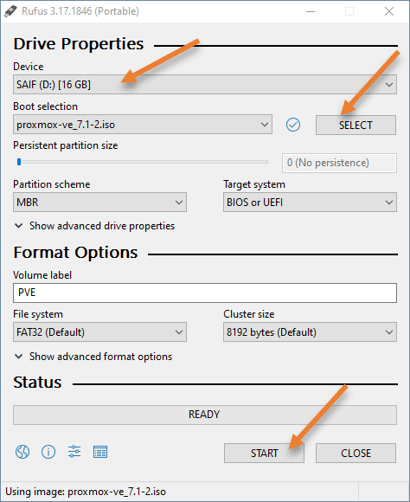
It will automatically pick up the Pendrive that you plugged in.
Boot selection-> Choose the Proxmox iso that you downloaded.
Leave everything else to default and click on Start.
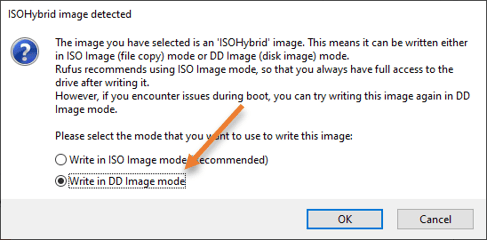
You will get a prompt that says ISOHypbrid image selected, in that choose Write in DD image mode and click on okay.
Note: Normally people would choose Write in ISO image mode and they ended up getting a grup rescue error when they boot from the USB. So make sure you choose DD image.
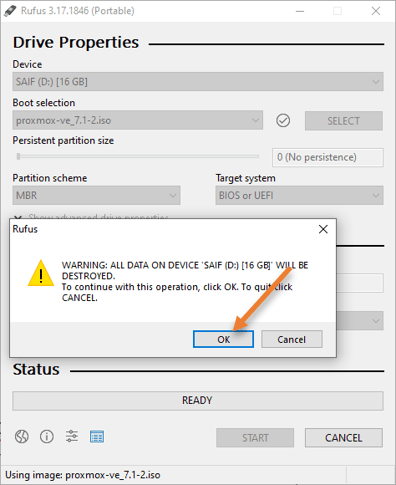
You will get the prompt that says all the files in the USB drive will be formatted, say Ok to that.
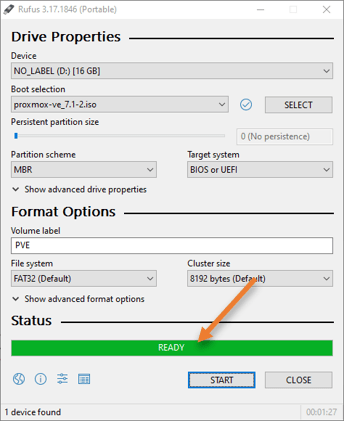
The process of making the bootable image will take some time, once it shows Ready on the Rufus software, your bootable Proxmox USB is ready to use for any hardwares where you want to deploy the Proxmox operating system.
Unplug the USB from your computer.
refrensi
getlabsdone : How to Install Proxmox VE Using a USB? | Step by Step.
Create Proxmox usb bootable #54
- Plugin the USB pen drive.
- Open the Rufus software.
- It will automatically pick up the Pendrive that you plugged in.
- Boot selection-> Choose the Proxmox iso that you downloaded.
- Leave everything else to default and click on Start.
- You will get a prompt that says ISOHypbrid image selected, in that choose Write in DD image mode and click on okay.
```
Note: Normally people would choose Write in ISO image mode and they ended up getting a grup rescue error when they boot from the USB. So make sure you choose DD image.
```
- You will get the prompt that says all the files in the USB drive will be formatted, say Ok to that.
- The process of making the bootable image will take some time, once it shows Ready on the Rufus software, your bootable Proxmox USB is ready to use for any hardwares where you want to deploy the Proxmox operating system.
- Unplug the USB from your computer.
# refrensi
- [getlabsdone](https://getlabsdone.com/how-to-install-proxmox-ve-with-a-usb-step-by-step/) : How to Install Proxmox VE Using a USB? | Step by Step.


Create Proxmox usb bootable #54
refrensi